AI Assistant
Hubleto's built-in AI Assistant, also known as Hubi, is an intelligent companion that supercharges your workflow. Operating directly within your CRM and ERP ecosystem, Hubi helps you interact with your data more effectively than ever before.
Meet Hubi
Hubi is designed to understand the context of your work. Whether you are a regular user navigating business features or a developer building extensions, Hubi adapts its knowledge to help you achieve your goals.
Intelligent Modes
Hubi can operate in two distinct modes, each tailored to specific needs:
-
User Mode:
- Purpose: Helps regular users with day-to-day operations like CRM, Invoicing, and Marketing.
- Capabilities: Summarize records, draft professional emails, explain business logic, or answer "how-to" questions about Hubleto.
- Source Knowledge: Hubi actively searches official user guides at help.hubleto.eu to provide accurate, non-technical answers.
-
Developer Mode:
- Purpose: Assists technical staff and developers in building and managing the Hubleto ecosystem.
- Capabilities: Write code snippets, create data models, debug issues, and explain framework-level functionalities.
- Source Knowledge: Hubi prioritizes developer documentation at developer.hubleto.eu and community discussions at community.hubleto.eu.
Contextual Awareness & The Magic Wand
One of the most powerful features of Hubi is its ability to understand exactly what you are looking at.
The Magic Wand Tool
Throughout Hubleto, you will find the Magic Wand icon located in the footer of record forms (e.g., in Campaigns or Customers).
When you click this icon:
- Hubi opens in a new tab.
- It automatically receives a detailed snapshot of the record you came from (the "context").
- You can immediately start asking specific questions like "Can you summarize this campaign?" or "Draft a follow-up email for this customer based on their history."
This contextual link saves you from manually copying and pasting data, allowing for highly relevant and instant assistance.
Real-time Information
Hubi isn't limited to a static knowledge base. It utilizes Google Search integration to fetch the latest information from official Hubleto sources in real-time. This ensures that the advice and code snippets you receive are always up-to-date with the latest framework versions and community updates.
Video Tutorial
Watch this quick video to see Hubi in action and learn how to use the Magic Wand tool to generate content seamlessly:
Configuration
To activate the AI Assistant for your organization:
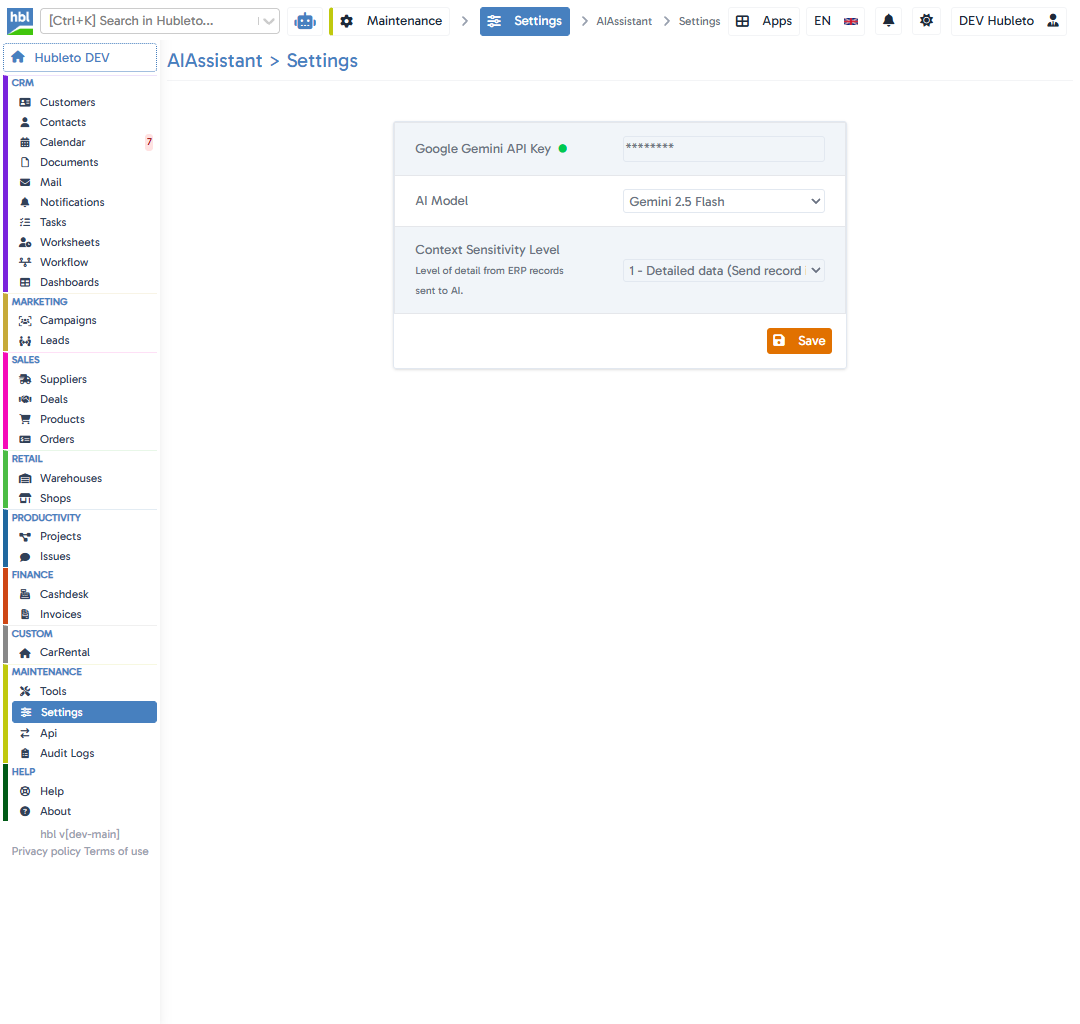
- Navigate to Settings in the main menu.
- Click on AIAssistant (found under the "All settings" section).
- Provide your Gemini API Key.
- Select your preferred AI model (e.g.,
gemini-2.0-flash). - Save your settings.
Once configured, the AI Assistant will be available to all users in your system.