
Homepage overview
The default homepage is the main starting point for working in Hubleto. It gives you quick access to apps, search, your user information, and your dashboard panels, while still allowing you to customize the layout to match your day-to-day work.
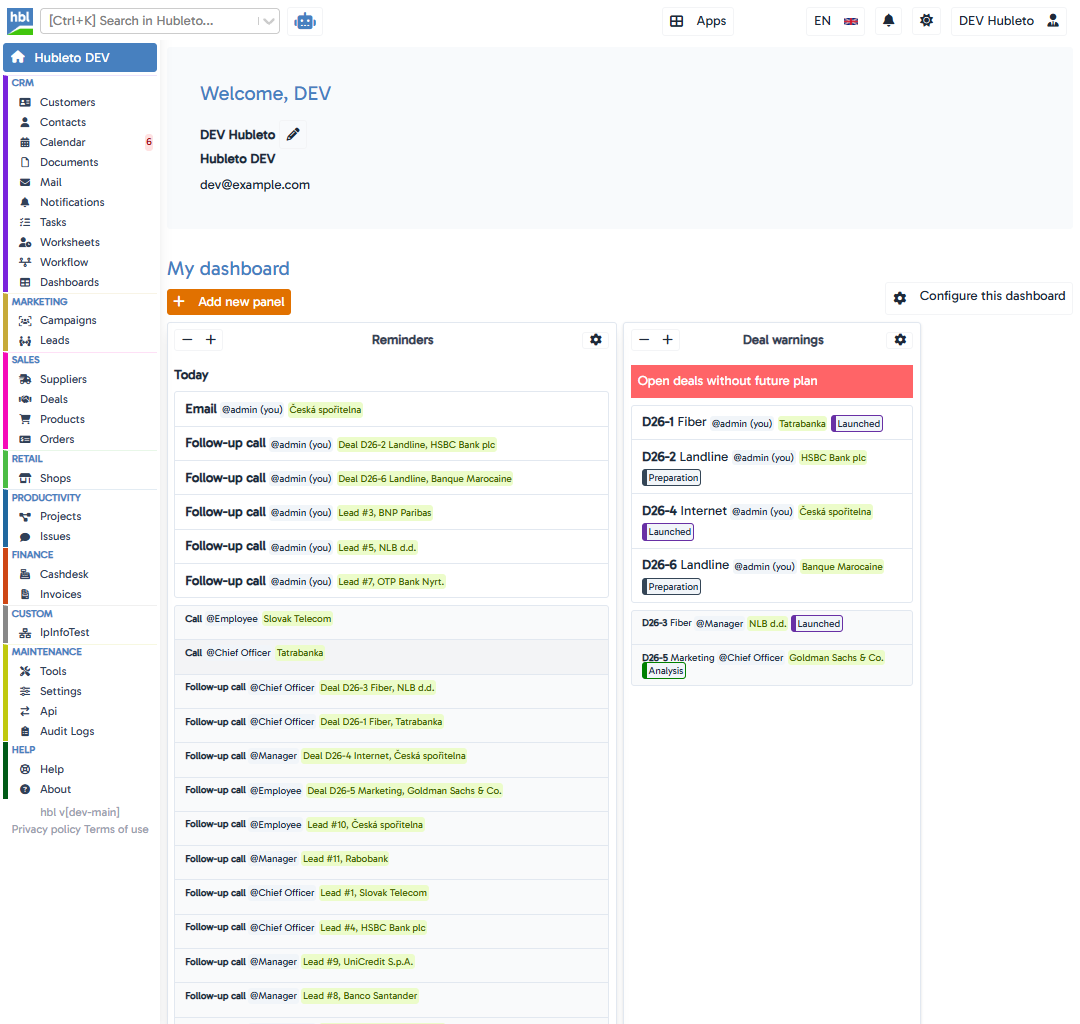
The screenshot above shows a typical default homepage layout.
What you can see on the homepage
The homepage usually contains several important areas:
- Left sidebar - a list of available Hubleto apps grouped by area, such as CRM, Marketing, Sales, Productivity, Warehouses, Finance, Communication, Maintenance, or Help.
- Top bar - quick access to the global search, the app launcher, language switch, notifications, settings, and your user menu.
- Welcome section - a personal area with your name and account information.
- Dashboard - a customizable set of panels showing useful summaries and quick overviews from different parts of Hubleto.
Main areas explained
Left sidebar
On the left side, you can see the apps available to your account.
Clicking an app name takes you directly from the homepage to that app. This makes the homepage a practical navigation hub, especially when you switch between several apps during the day.
Top bar and search
At the top, Hubleto provides quick navigation tools.
The search bar helps you find records or move around the system more quickly. You can also see quick controls for:
- language,
- notifications,
- settings,
- your user account menu.
Welcome section
The welcome section introduces your current workspace and usually shows your name together with account-related information. Depending on your setup, it may also show your photo, company, position, or editable profile details.
Dashboard panels
Below the welcome area is your dashboard. The dashboard is designed to give you a quick overview of useful data from different apps.
Depending on your setup, the dashboard can usually be adjusted by:
- adding new panels,
- removing panels you do not need,
- changing panel size or position,
- configuring the content shown in a panel.
This makes the homepage more than just a landing page. It becomes a working overview tailored to your role.
Why the homepage is useful
The homepage helps you:
- open apps quickly,
- review key data at a glance,
- keep important shortcuts in one place,
- personalize the dashboard to fit your workflow.
Tips
Use the homepage as your main orientation point when starting work for the day.
Keep only the dashboard panels that are actually useful for your role.
Use the top search bar whenever you want to move to a record faster than by manual navigation.
Review your language, settings, and account options from the top-right controls when needed.
Common mistakes
Ignoring dashboard customization: leaving unnecessary panels in place can make the homepage less useful.
Overlooking the top bar tools: search, notifications, and user settings are easy to miss if you focus only on the sidebar.
Treating the homepage as static: the page is meant to support your workflow and can often be adjusted to fit it better.
Summary
| Topic | Summary |
|---|---|
| Purpose | The homepage is the main starting screen for navigation and overview in Hubleto. |
| Sidebar | Shows the apps available to your account. |
| Top bar | Contains search and quick user controls such as language, notifications, and account access. |
| Dashboard | Displays customizable panels with useful summaries from different apps. |